Guide · podcast CRM
How to manage podcast guests without spreadsheets
By George Lowe · Founder, PodReach · PodReach
Published 24 July 2026 · Updated 24 July 2026
Replace the spreadsheet with a shared guest pipeline that carries contact history, outreach status, booking state, episode context and follow-up ownership — so teammates can continue the relationship without reconstructing it from inboxes.
Guest management is the operational system for knowing who you want on the show, where each person is in the journey, what has already been said, and who owns the next action.
This guide maps spreadsheet failure modes to a practical guest pipeline, covers team ownership, and explains when a simple sheet is still sufficient versus when a podcast CRM becomes useful.
Where spreadsheets break down
Spreadsheets are excellent for a short personal list. They struggle when outreach replies live in inboxes, booking lives in a calendar tool, recordings live elsewhere, and follow-up depends on someone remembering to send assets after publish.
- Duplicate invites when teammates cannot see history
- Stale stages that nobody updates after a reply
- Missing episode context (“which recording was this?”)
- No ownership for post-episode relationship steps
- Agency or multi-host teams invent parallel sheets
A guest pipeline that matches podcast operations
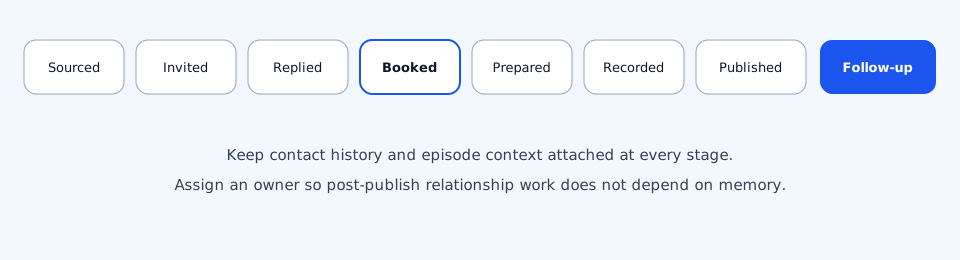
- Sourced — Identified as a fit; research notes captured
- Invited — Outreach sent on a connected channel
- Replied — Human conversation in progress; automation paused
- Booked — Time and session logistics confirmed
- Prepared — Questions, briefs, or guest prep complete
- Recorded — Conversation captured
- Content ready — Episode/assets prepared for publish
- Published — Live with guest notified where appropriate
- Follow-up — Relationship next step owned and dated
Your labels can differ. The requirement is that stages reflect show operations — not generic sales opportunity stages that ignore episode context.
Contact history and episode context
A useful guest record answers: Have we invited them before? What did they say? When are they booked? Which episode resulted? Who should follow up after publish?
PodReach podcast CRM keeps guest pipeline and relationship context next to outreach, booking and episode work so those answers are not trapped in one person’s inbox. A traditional sales CRM can still be the system of record for company-wide opportunities outside the podcast motion.
Team ownership without chaos
- Assign an owner for each active guest
- Make stage changes visible to producers and hosts
- Separate “messaging owner” from “recording owner” when needed
- Review stuck stages weekly (invited with no reply, recorded with no follow-up)
When a spreadsheet may still be enough
A sheet can still work for a solo host doing a handful of episodes with one inbox and no teammates. The tipping point is collaboration, volume, or lost follow-up after publish.
- Solo operator, low volume, single channel
- Short-lived project with a fixed guest list
- No need for shared ownership or auditability
What a podcast CRM adds
A podcast CRM is not “spreadsheet with nicer fonts.” It is a system of record for guest relationships tied to outreach, booking and episodes. See also the comparison guide for when a traditional CRM remains necessary.
PodReach positions podcast CRM inside podcast relationship management — guest pipeline and follow-up — not as a full replacement for every enterprise sales CRM.
Fit guidance
Good fit
- Multiple people touch invites, booking or follow-up
- You lose context between outreach and publish
- You want episode-linked relationship history
Not ideal
- A one-person show with a tiny guest list and no collaboration need
- Teams that only need company-wide opportunity forecasting (use a sales CRM for that)
FAQ
What is a podcast guest pipeline?
A shared sequence of stages — such as sourced, invited, booked, recorded, published and follow-up — that shows where each guest is and who owns the next action.
Can I keep using a spreadsheet?
Yes, for low-volume solo workflows. Move on when collaboration, lost replies or missed post-episode follow-up start costing relationships.
Is a podcast CRM the same as HubSpot or Salesforce?
No. Traditional CRMs optimise accounts and opportunities. A podcast CRM centres guest and episode context. Many teams use both for different jobs.
How does PodReach help?
PodReach keeps guest pipeline, outreach status, booking context and relationship follow-up in one podcast relationship management workspace.
References
- Salesforce: What is CRM? — Salesforce
- HubSpot: What is a CRM? — HubSpot
Related guides
Keep guest context attached to the show
Explore PodReach podcast CRM if you want pipeline and follow-up beside outreach and booking — or adopt the pipeline model in your current tools.